Monitoring SNI SSL Certificates
This topic explains how to monitor multiple SSL certificates on a single IP address (SNI) by treating each domain as a separate Node in NetCrunch, and how to accurately aggregate their status using a Composite Status Node.
The Core Problem: One IP, Many Certificates
Modern web servers (like IIS, NGINX, or Apache) often host dozens of websites on a single IP address using Server Name Indication (SNI).
If you add the web server to NetCrunch as a single "Device Node" (e.g., by its IP 192.168.1.50), you generally can only monitor the default SSL certificate. You cannot easily monitor the specific certificates for example.com, shop.example.com, and blog.example.com if they are all hosted on the same IP.
The NetCrunch Solution: Domain-Based Nodes
To monitor SNI certificates correctly, you must follow the Node = Service Endpoint principle.
Instead of adding the server once, you add a separate Node for each domain you want to monitor.
How it works
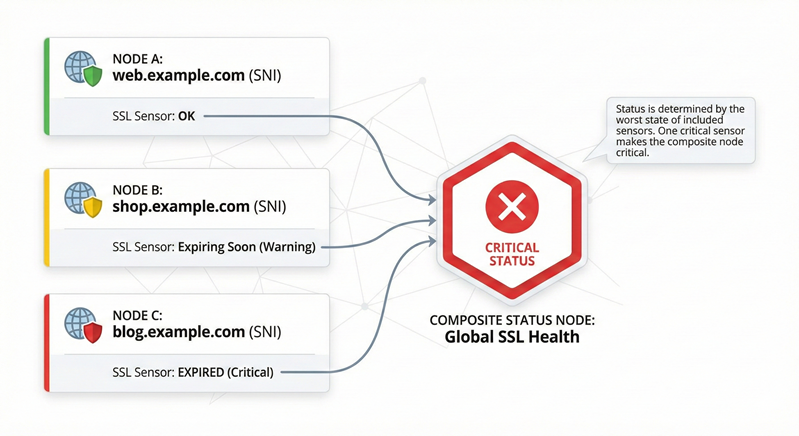
- Node A:
www.example.com(Resolves to1.2.3.4) - Node B:
shop.example.com(Resolves to1.2.3.4) - Node C:
blog.example.com(Resolves to1.2.3.4)
Even though all three resolve to the same IP address, NetCrunch treats them as distinct entities. When the SSL Sensor on "Node A" connects, it specifically requests the certificate for www.example.com during the TLS handshake (SNI), ensuring the correct certificate is validated.
Configuration Guidelines
1. One Domain = One Node
Create a separate node for every domain name you wish to verify.
- Do not try to stack multiple SNI checks for different domains onto a single node.
- Naming: Name the node exactly as the domain (e.g.,
client-portal.com). This makes it easy to identify which certificate is expiring in alerts.
2. The SSL Certificate Sensor
The sensor automatically uses the Node's name as the SNI parameter.
- Connection: It connects to the resolved IP but sends the Node Name in the Client Hello.
- Validation: It checks the specific certificate returned for that hostname (Issuer, Expiry, Revocation).
- Ports: You can add multiple sensors to one node if the same domain uses multiple ports (e.g.,
443and8443).
3. Ignoring the "Device"
Since these nodes represent virtual services, you usually do not need to monitor the underlying hardware on these specific nodes.
- Tip: You can disable "Infrastructure Services" (like Ping or SNMP) on these SNI nodes to avoid redundant alerts if the underlying server goes down. Keep the hardware monitoring on the main "Device Node."
Summary of Architecture
| Monitoring Goal | Node Strategy |
|---|---|
| Physical Server Health | Create one Node by IP or Hostname. Monitor CPU, RAM, and Disk. |
| SNI / Virtual Hosts | Create multiple Nodes (one per URL). Monitor SSL, HTTP, & Application health. |
Aggregating Health: The Composite Status Node
Because standard folder status may not accurately reflect specific sensor errors (depending on your version configuration), the reliable method to group these checks is using a Composite Status Node.
How to Configure
- Create Node: Add a new node of type Composite Status. Name it "Global SSL Status".
- Monitoring: In the node settings, go to the Monitoring tab.
- Add to "Critical" Group: Click +Add next to the Critical section. Select the SSL Certificate sensors from your individual SNI nodes (Node A, Node B, Node C).
Choosing the Right Logic Group
For SSL monitoring, you should use the Critical group.
-
Critical: If any added object is Down/Warning, the Composite Node becomes Down/Warning.
- Use Case: Essential for certificates. If one expires, you need an immediate alert.
-
Redundant: The Composite Node only goes Down if all added objects are Down.
- Use Case: Clustered services where one failure is acceptable. (Not recommended for unique certificates.)
-
Influential: If an object is Down, the Composite Node only shows a Warning.
- Use Case: Low-priority items where a failure shouldn't trigger a full outage alert.
Benefits of this Model
- Precise Status: The status is derived strictly from the SSL sensors you added to the Critical list.
- Single Alert: You can configure alerts on the Composite Node to notify you if the node status changes, covering all contained certificates at once.