
SNMP MIB Compiler
Manage, extend, and explore SNMP MIB definitions used by NetCrunch for SNMP-based monitoring.
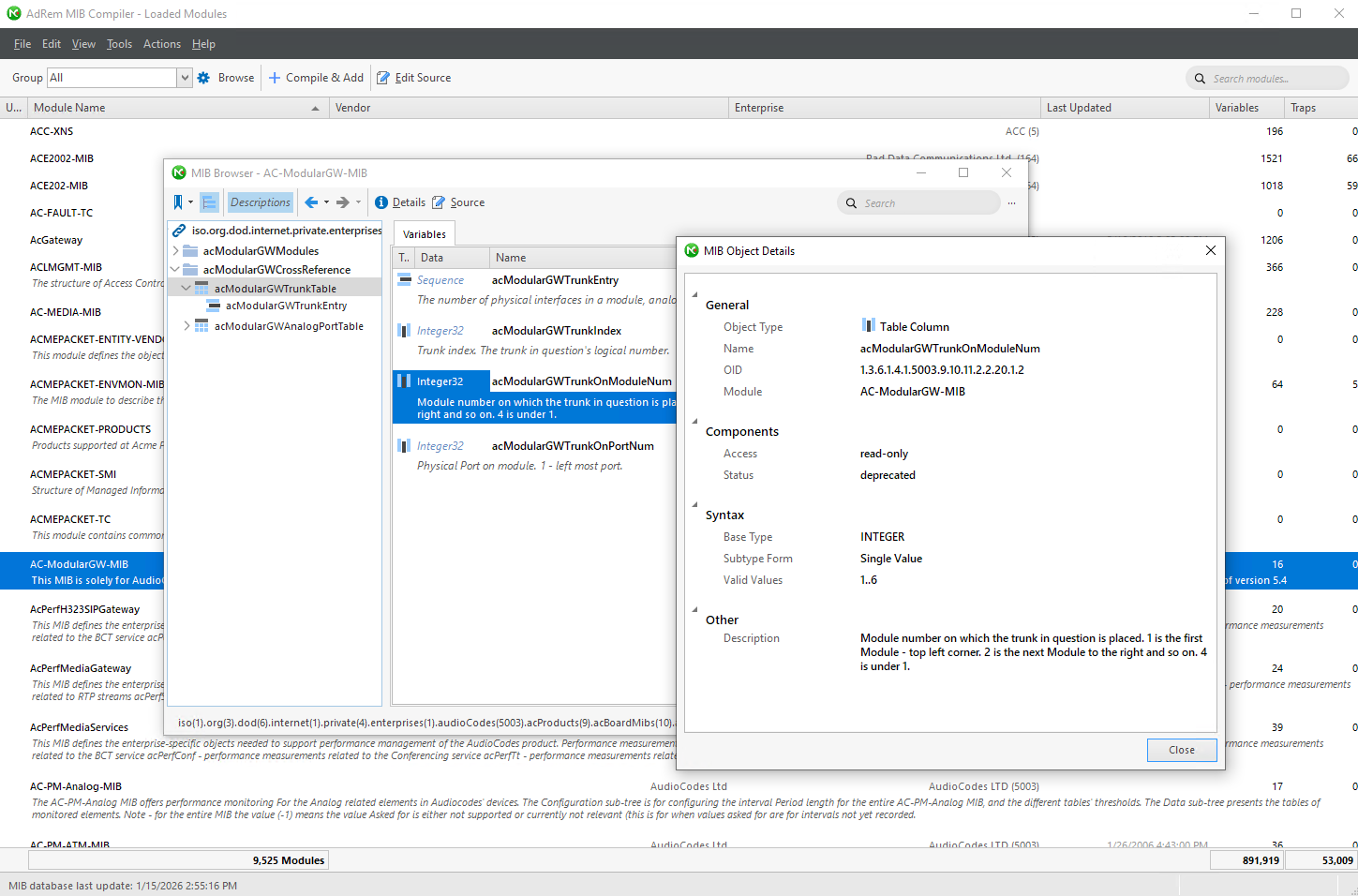
Settings Monitoring SNMP SNMP MIB Data & Compiler
NetCrunch includes a large, pre-compiled SNMP MIB library with more than 9,500 vendor and standard MIB modules.
This library covers most common network and infrastructure devices out of the box, including Cisco, Nortel, 3Com, Alcatel, AudioCodes, and many others.
The SNMP MIB Compiler allows you to extend and maintain this library by compiling additional MIB files and inspecting their internal structure.
It is a server-side tool and should be launched from the Administration Console.
Why the MIB Compiler matters
SNMP monitoring depends on correct MIB definitions.
The compiler is not just a file importer, it is a diagnostic and inspection tool that lets you:
- Validate vendor MIBs before using them in production
- Inspect tables, variables, and traps in a structured form
- Understand how device-specific counters are organized
- Verify OIDs, access levels, data types, and valid ranges
This is especially useful when working with non-standard, deprecated, or poorly documented vendor MIBs.
Main capabilities
The SNMP MIB Compiler provides the following functionality:
- Compile and add new MIB modules to the NetCrunch MIB database
- Edit MIB source files before compilation
- Browse MIB contents using a hierarchical tree view
- Inspect variables, tables, table columns, and traps
- Display full object details, including OID, syntax, access, and description
- Create aliases for selected MIB objects
- Remove obsolete or unused MIB modules
- Search for objects across all loaded MIBs
- Sort and filter the full MIB module list
Browsing MIB objects
Once a MIB is compiled, you can browse its structure using the integrated MIB Browser:
- The left panel shows the MIB tree based on OID hierarchy
- Tables and table entries are clearly distinguished from scalar variables
-
Selecting an object displays its full definition, including:
- Object type (scalar, table, table column)
- Numeric OID
- Syntax and valid value range
- Access rights (read-only, read-write)
- Status (current, deprecated, obsolete)
- Original vendor description
This view is particularly helpful for understanding complex table-based MIBs and mapping indices to real-world device components.
Finding newly added MIBs and objects
After compiling a new MIB module:
- Use Ctrl+F to search for variables, tables, or traps by name
- Search works across the entire MIB database, not just the current module
- This makes it easy to verify that new definitions are available for sensors, SNMP views, or custom monitoring logic
Practical usage notes
- Compiling a MIB does not automatically create sensors or views
It makes the definitions available to NetCrunch - Deprecated objects are still shown for compatibility and analysis
- The compiler is intended for administrators and advanced users working with SNMP internals