
Options: Notification
Notification options - the alert window, the SMTP servers used for email, and the redundant server list that takes over when one fails.
ToolsOptionsNotification
Notification Window
Enables changing alert dialog settings such as close screensaver, play sound, and the number of last events kept.
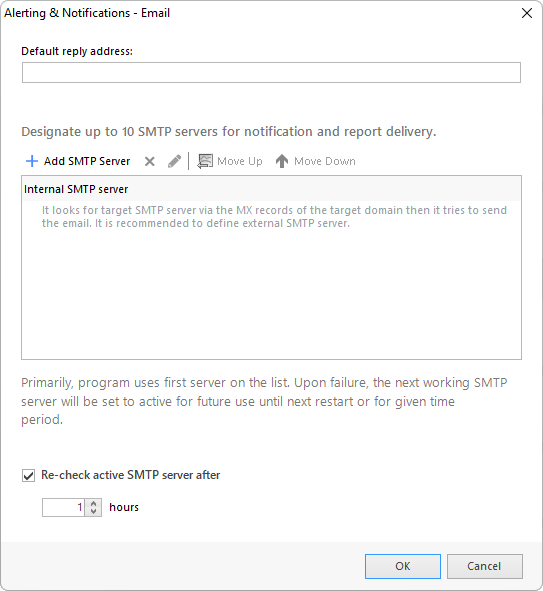
In the program, you have an option to use the built-in SMTP server or an external SMTP mail server for sending email notifications during the alerting process.
- Default reply address
- The reply email address to be used by the program when sending emails.
Redundant SMTP Server List
You can specify multiple external servers which will be used in order from to bottom in case of given server connection failure.
SMTP Server Parameters
- Server name or address
- The name or address of the external email server that you plan to use for the NetCrunch alerting process.
- Port
- The port of the external SMTP mail server.
- Account email address
- Email account to be used for the given server.
- Server requires authentication
- Select this check box If the external SMTP mail server requires authentication.
- Username
- The username to login to the external SMTP mail server.
- Password
- The password to login to the external SMTP mail server.
- Encrypted connection (TLS)
- The program will use TLS version of SMTP protocol.
- Re-check active SMTP Server after
- Specify the time (hours) after which the SMTP server will be rechecked.
GSM/Mobile Device
Enables notifications via a mobile phone connected to the computer running NetCrunch via a COM port.
You may use a standard cable attachment, Bluetooth, IRDA or any other type of connection - as long as it uses one of the computer COM ports.
You must define the settings in NetCrunch for the GSM mobile device.
Select the COM port to be used, define port parameters and other options related to the GSM device such as additional initialization AT+C commands.
- COM Port
- Shows the COM port selected for communication with the mobile phone. Clicking the Browse button opens the GSM Device Discovery dialog, where you may choose/configure the appropriate COM port.
SMS Settings
- Limit to single text message (typically 160 chars)
- Splits the message over 160 characters into two or more notification messages.
- Encoding
- Select the type of encoding: Auto, 7-bit or 16-bit.
Modem Settings
- PIN
- Specify PIN number.
- Initialization AT+C commands
- Select this check box if you plan to send initialization AT+C commands. Enter the commands in the field below.
- Configuring Notification Services
Read to configure emails and text messages (SMS) with NetCrunch notifications.
- Options: General
General program options - server and Web Access ports, encryption and certificates, error reporting, the event database, and update notifications.
- Options: Monitoring
Monitoring options - the NetCrunch node address and how it is chosen, discovery defaults, and the settings that prevent false DOWN alerts.