
IP Tools - Remote Network Diagnostic
Overview of NetCrunch IP Tools as remote-capable diagnostic utilities available in both Desktop and Web Console, with flexible execution backends including server, probes, and NCC.
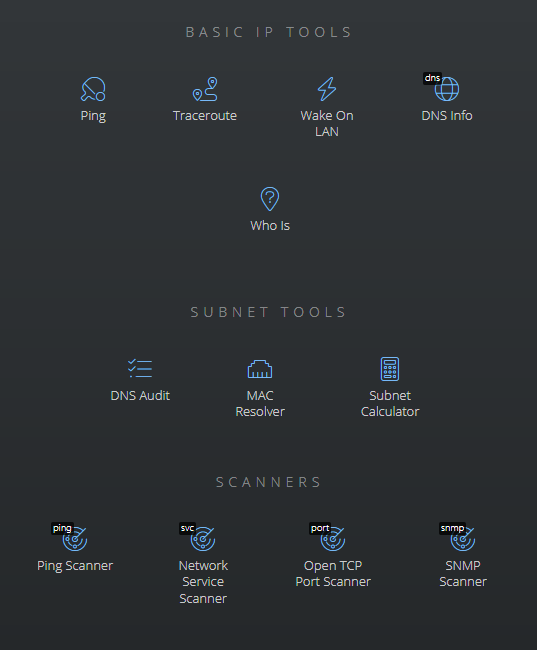
NetCrunch IP Tools is a collection of network diagnostic, subnet, and scanning tools designed to work consistently across Desktop Console and Web Console.
The key concept behind IP Tools in NetCrunch is execution context. These are not just local utilities. Each tool can be executed from different network perspectives, making them safe and extremely powerful in distributed environments.
Execution Modes and Backends
IP Tools can run in multiple modes depending on the console and backend selection:
-
Desktop Console
- Run locally on the administrator workstation
- Run remotely using NetCrunch Server
- Run remotely using any connected Probe
-
Web Console
- Run remotely using NetCrunch Server
- Run remotely using any connected Probe
When using NetCrunch Connection Cloud (NCC), IP Tools can be executed securely from anywhere in the world using only a web browser. No inbound firewall rules are required, and execution always happens inside your infrastructure, never on the client machine.
This model allows administrators to: - Test connectivity from the same network segment as monitored devices - Compare results from different probes or locations - Safely diagnose remote networks without VPN access - Avoid running diagnostic traffic from untrusted endpoints
Basic IP Tools
Ping
Tests the reachability of a host and measures round-trip time between the selected execution backend and the destination.
Options
- Timeout
- Time to wait for a reply before the packet is considered lost.
- Packet Delay
- Delay in seconds between consecutive packets.
- Data Size
- Size of the packet sent to the destination host.
Traceroute
Displays the network path and measures transit delays between the execution backend and the destination.
Options
- Max Hops
- Maximum number of intermediate hops.
- Timeout
- Time to wait for a reply before considering the packet lost.
- Refresh
- Interval in seconds for refreshing traceroute results.
- Resolve Names
- Resolves DNS names for discovered hops.
Wake on LAN
Sends a Wake-on-LAN magic packet to remotely power on a device.
The target device must have Wake-on-LAN enabled in BIOS or firmware.
The only required parameter is the MAC address of the target machine.
DNS Info
Queries a selected DNS server for detailed information about a domain name or IP address.
Options
- DNS Server
- DNS server used for the query.
- Port
- DNS server port. Default is 53.
Whois
Retrieves registration and ownership information for a domain or IP address. The tool automatically discovers the appropriate WHOIS servers and follows referrals if enabled.
Options
- Select Appropriate Server Automatically
- Allows manual WHOIS server selection when disabled.
- Follow Referrals
- Controls whether WHOIS referrals are followed.
Subnet Tools
DNS Audit
Scans a range of IP addresses and performs reverse DNS lookups, followed by forward verification to ensure address-to-name consistency.
Options
- Use Default System Server
- If disabled, a custom DNS server can be specified.
MAC Resolver
Scans an IP range to resolve MAC addresses and identifies network card vendors based on known prefixes.
Options
- Show Only Resolved Addresses
- Filters out unresolved IP addresses.
Subnet Calculator
Calculates subnet ranges, masks, usable address ranges, and broadcast addresses based on IP address and netmask input.
Scanners
Ping Scanner
Periodically scans a range of IP addresses to detect active hosts and performs reverse DNS lookups.
Options
- Timeout
- Time to wait for ping replies.
- Refresh
- Interval in seconds for repeating the scan.
Network Service Scanner
Detects well-known TCP and UDP services running on hosts within a given IP range.
Options
- UDP Timeout
- Timeout for UDP service detection.
- TCP Timeout
- Timeout for TCP service detection.
- Resolve DNS Names
- Resolves hostnames for detected services.
- List of Services
- Selects which services are included in the scan.
Open TCP Port Scanner
Scans IP ranges for open TCP ports without attempting protocol-level service detection.
Options
- Port Range
- Well-known ports, extended ranges, trojan ports, or custom ranges.
- Timeout
- Time to wait for TCP responses.
- Resolve Names
- Resolves DNS names for scanned hosts.
SNMP Scanner
Queries devices using SNMP to retrieve basic system information.
Options
- Port
- SNMP port. Default is 161.
- SNMP Protocol
- Supported versions are V1, V2c, and V3.
- Community (V1 and V2c)
- Community string used for authentication.
- User (V3)
- SNMPv3 user name.
- Authentication Protocol
- HMAC-MD5-96 or HMAC-SHA-96.
- Authentication Password
- Password for authentication.
- Encryption Type
- DES, 3DES, AES128, AES192, AES256.
- Encryption Password
- Password for encryption.
- Resolve Names
- Resolves DNS names for scanned hosts.