
Time Restriction Scheme
Custom scheduling options for monitoring, alerts, and notification, allowing for precise control over various program activities.
The program uses time restrictions to define time conditions for various elements, such as node monitoring, alerting conditions, or notification schemes.
In recent versions, the time restriction scheme has been extended to allow different schemes to be set for each weekday. You can select a single time range by including or excluding a specific time range, providing greater flexibility in scheduling.
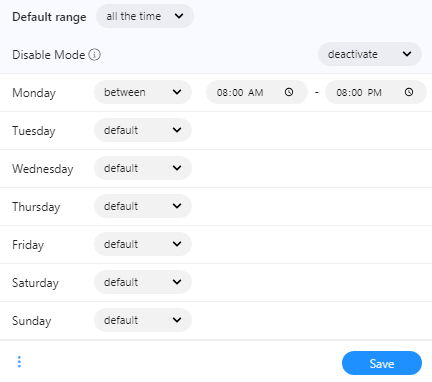
Time Restriction Scheme is used for:
- Actions
- You can set when an action can be executed.
- Event Condition
- For some conditions such as: event not happened in the time between.
- Notification
- In the user profile, each notification type can have different time range settings. For example, you can receive some notification types on weekdays and others on weekends.
- Atlas Monitoring
- Here, you can set a global monitoring scheme for Atlas.
- Node Monitoring Scheme
- Each node can have its monitoring time scheme.
- Node State Alert
- You can set an alert if the node is not in the right state at the given time (for example, in instances when it should be DOWN at night).